Rudraksha Certificate Verification: How QR Code and Certificate Number Checks Work
In an era where paper certificates can be duplicated with basic photo editing software, digital rudraksha certificate verification is the gold standard that protects buyers, reputable dealers, and gemological testing centers. A physical certificate is only as trustworthy as the online verification database that backs it.
Whether purchasing a sacred 14 Mukhi bead online, verifying a temple's Indra Mala, or checking export documentation, performing an instant rudraksha certificate verification via QR code or serial number confirms that the physical bead matches the unalterable diagnostic record stored in the laboratory's cloud system.
How Online Rudraksha Certificate Verification Works Behind the Scenes
When an accredited laboratory issues a report using enterprise rudraksha lab software, the verification architecture follows a synchronized, tamper-evident data cycle:
Step 1: Dynamic QR Code Embedding
When the certificate is printed, the software generates a high-density 2D QR code encoding an encrypted HTTPS URL on the laboratory's official custom domain (e.g., https://labauthentiq.com/verify/?id=RLT-2026-0168). The QR code is printed directly onto the CR-80 PVC plastic card or A4 paper dossier.
Step 2: Sub-50ms Cloud Database Lookup
When a buyer scans the QR code with their smartphone camera, the request hits the cloud edge server. In under 50 milliseconds, the server verifies the cryptographic token and retrieves the original, immutable specimen record from NVMe storage.
Step 3: Full-Fidelity Visual & Radiographic Cross-Examination
The buyer's screen displays the official verified record: the high-resolution macro photograph, exact weight in grams (down to 0.01g), triple-axis dimensions, origin (Nepal vs Java), and the digital X-ray radiograph proving the internal locule count matches external flutes.
The Two Verification Methods Every Customer Should Use
Reputable testing centers provide dual-factor verification pathways to accommodate all devices and verification conditions:
Method 1: Instant Smartphone QR Code Scan
This is the fastest method. Open the default camera app on any iPhone or Android phone, point it at the QR code on the back of the Smart PVC card, and tap the notification link. Ensure the browser URL matches the official laboratory domain (and not an imitation domain).
Method 2: Manual Certificate Number Search
If scanning is inconvenient, visit the laboratory's official verification portal (e.g., yourlab.com/verify) and enter the unique certificate number printed on the report (such as RLT-2026-0168). The server returns the identical verified cloud record.
4 Red Flags That Indicate a Fake or Tampered Verification
Counterfeiters frequently deploy deceptive tactics to mimic genuine verification systems. Watch for these critical warning signs:
- The QR Code Redirects to a Free Hosting URL: If the QR code opens a free subdomain (e.g.,
wixsite.com,weebly.com, or an unbranded generic domain), the certificate is forged. Genuine labs use their own custom domain name. - Weight Discrepancy Exceeding 0.05g: When re-weighing the physical bead on a jewelry scale, the weight must match the certificate within natural dehydration tolerance (±0.05g). A significant variance indicates the certificate belongs to a different bead.
- Missing Digital X-Ray on Public Lookup: If the physical card claims the bead was X-ray tested but the online verification record only shows a white-light photo with no radiograph scan, the report has likely been fabricated.
- Static PDF Download Only: Phishing sites often display a static PDF file instead of dynamic database-driven HTML records with interactive zoom and live SSL validation.
Recommended Technical Guides & Whitepapers
Frequently Asked Questions (FAQ)
How does QR code verification work on a Rudraksha certificate? ↓
Scanning the QR code opens the testing lab's official HTTPS cloud database. The cloud fetches the original high-resolution photo, exact gram weight, dimensions, and digital X-ray scan, making Photoshop counterfeits instantly recognizable.
Can scammers create fake QR codes? ↓
Yes, scammers frequently print QR codes linking to spoofed lookalike domains. Always check your browser's address bar to ensure the domain matches the laboratory's official corporate website.
What if a certificate number lookup shows no results? ↓
If the official lookup portal displays "Record Not Found", the report is likely forged or invalid. Reputable testing centers maintain permanent, unalterable digital records of all certified specimens.
How does LabAuthentiq software power verification? ↓
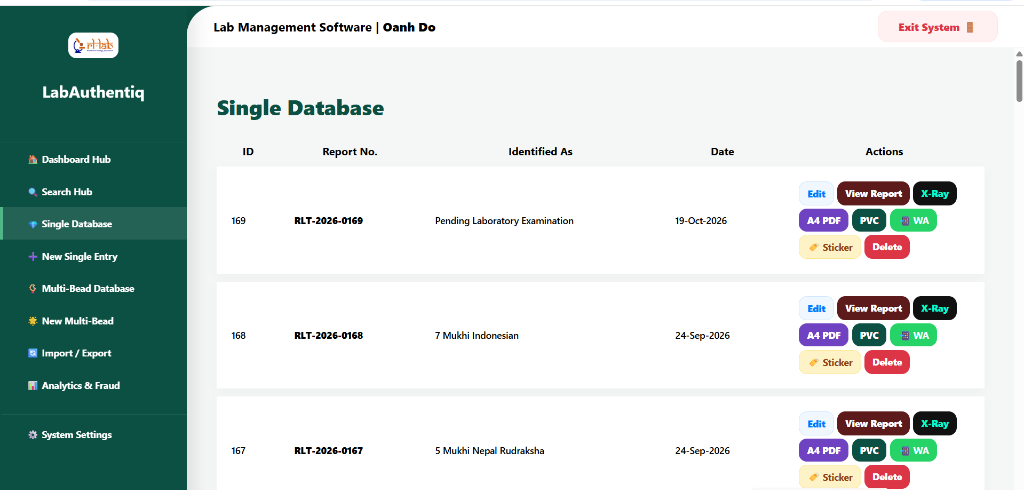
LabAuthentiq SaaS automatically generates sub-second public lookup pages for every issued certificate, complete with high-resolution imagery, radiograph locule inspection, and mobile responsiveness on your lab's own custom domain.
Equip Your Lab with Instant QR Verification
Protect your testing reputation with LabAuthentiq SaaS. White-labeled QR verification on your own domain with 1 Year of Cloud Hosting included.